MQTT Data Forwarding
MQTT Data Forwarding allows you to forward device data to a specified MQTT server in real-time, suitable for integration with third-party systems, data backup, etc.
Features
- Support forwarding by Device, Group, or Product.
- Support scripts.
- Support multiple forwarding targets.
- Real-time data forwarding.
- Support encrypted transmission.
Configuration Steps
1. Basic Configuration
- Go to Data Forwarding page.
- Click "Add Data Source".
- Select Target Type as "MQTT".
2. MQTT Configuration Parameters
Required Parameters
- Name: Rule name.
- Host/IP: Target MQTT server address (e.g., 104.156.140.42).
- Port: MQTT server port (e.g., 1888).
- Publish Topic: Message publishing topic (e.g., smarthome).
- QoS: Message Quality of Service (e.g., 0).
- MQTT Version: Select MQTT protocol version (e.g., 3.1.1).
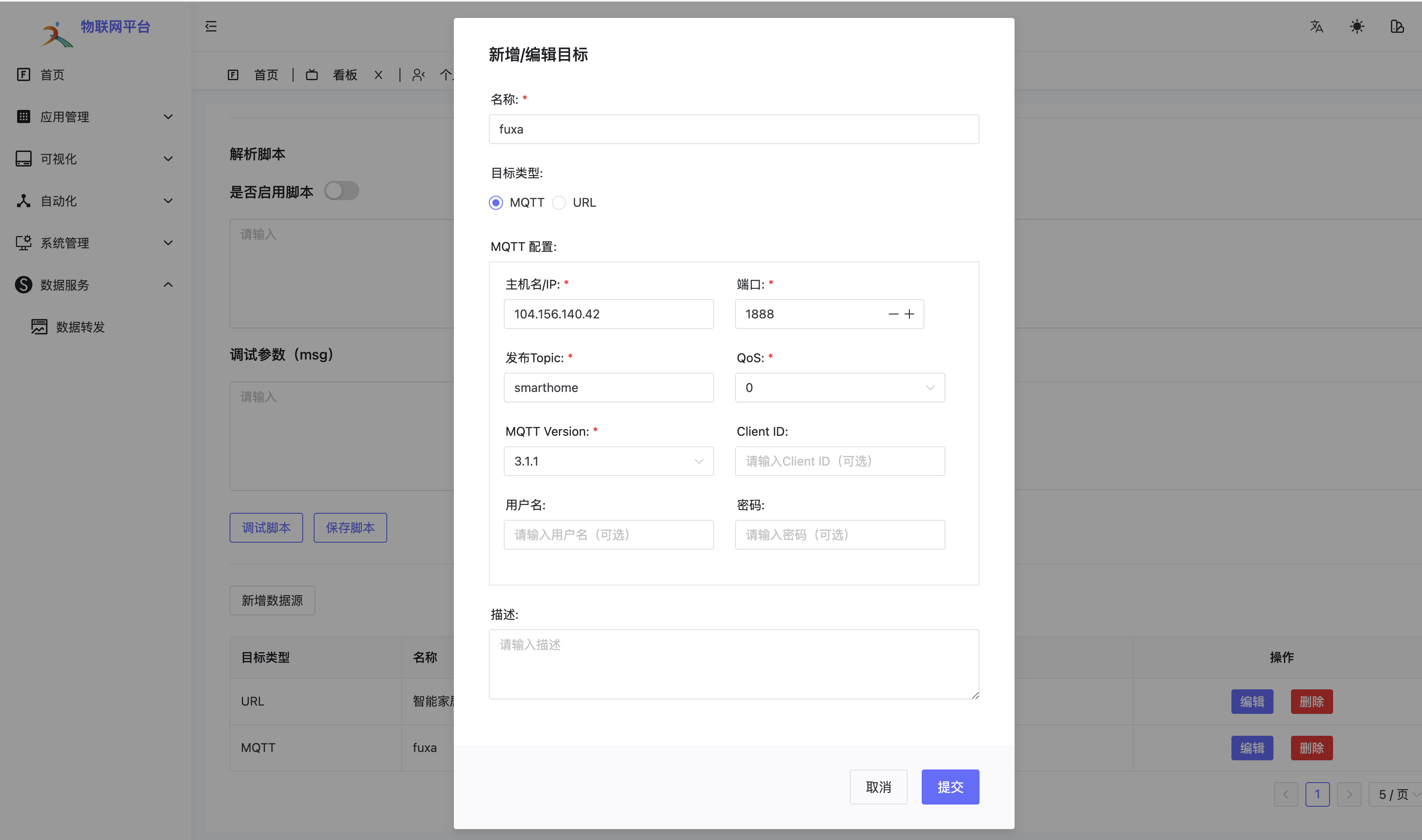
Optional Parameters
- Client ID: MQTT Client Identifier.
- Username: MQTT server username.
- Password: MQTT server password.
- Description: Rule description.
3. Operation Description
- Fill in required parameters, click "Submit" to save.
- Use "Edit" button in list to modify.
- Use "Delete" button to remove rule.
Configuration Example
Name: fuxa
Host/IP: 104.156.140.42
Port: 1888
Publish Topic: smarthome
QoS: 0
MQTT Version: 3.1.1
Notes
- Ensure target MQTT server is accessible.
- Check if port is open.
- If authentication required, fill in correct username and password.
- Topic name must follow MQTT specifications.
- Recommend testing before production use.
Verification
- After configuration, use MQTT client tool to subscribe to the configured Topic.
- Send test data via platform.
- Confirm target Topic receives forwarded message.