Device Connectivity Service Dev Guide
Overview
Background & Issues
In the IoT field, communication protocols are extremely diverse and complex. Common protocols include MQTT, TCP, HTTP, SOAP, Modbus, OPC-UA, Bacnet, KNX, LwM2M, SNMP, etc., along with countless other protocols and various gateway or third-party services.
- Complexity: These protocols and services differ in communication patterns and message specifications, leading to huge complexity in system integration.
- Consequences: This complexity makes the system bloated and inefficient, and also difficult to extend and maintain, resulting in high maintenance costs.
Service Definition
The Device Connectivity Service is a multifunctional middleware component that acts as a bridge between devices and the system, connecting devices to the ThingsPanel platform and enabling interaction between devices and the platform.
Service Categories
- Device Connectivity Service: Supports various IoT protocols (e.g., MODBUS, MQTT), enabling ThingsPanel to communicate directly with devices using these protocols.
- Third-party Connectivity Service: Connects ThingsPanel with various third-party IoT platforms, communicating with devices indirectly to achieve data interoperability and device management.
Key Features
- 🔗 Provides unified interface specifications, simplifying access for devices and third-party platforms.
- 🌐 Supports multiple protocols and services, enhancing ThingsPanel's compatibility and extensibility.
- ⚙️ Enables flexible configuration and credential management, facilitating quick access to different protocols and third-party platforms.
- 📊 Real-time data synchronization and device status monitoring.
- 🔧 Modular design, easy to extend to support new protocols and third-party platforms.
Interaction Structure Diagram
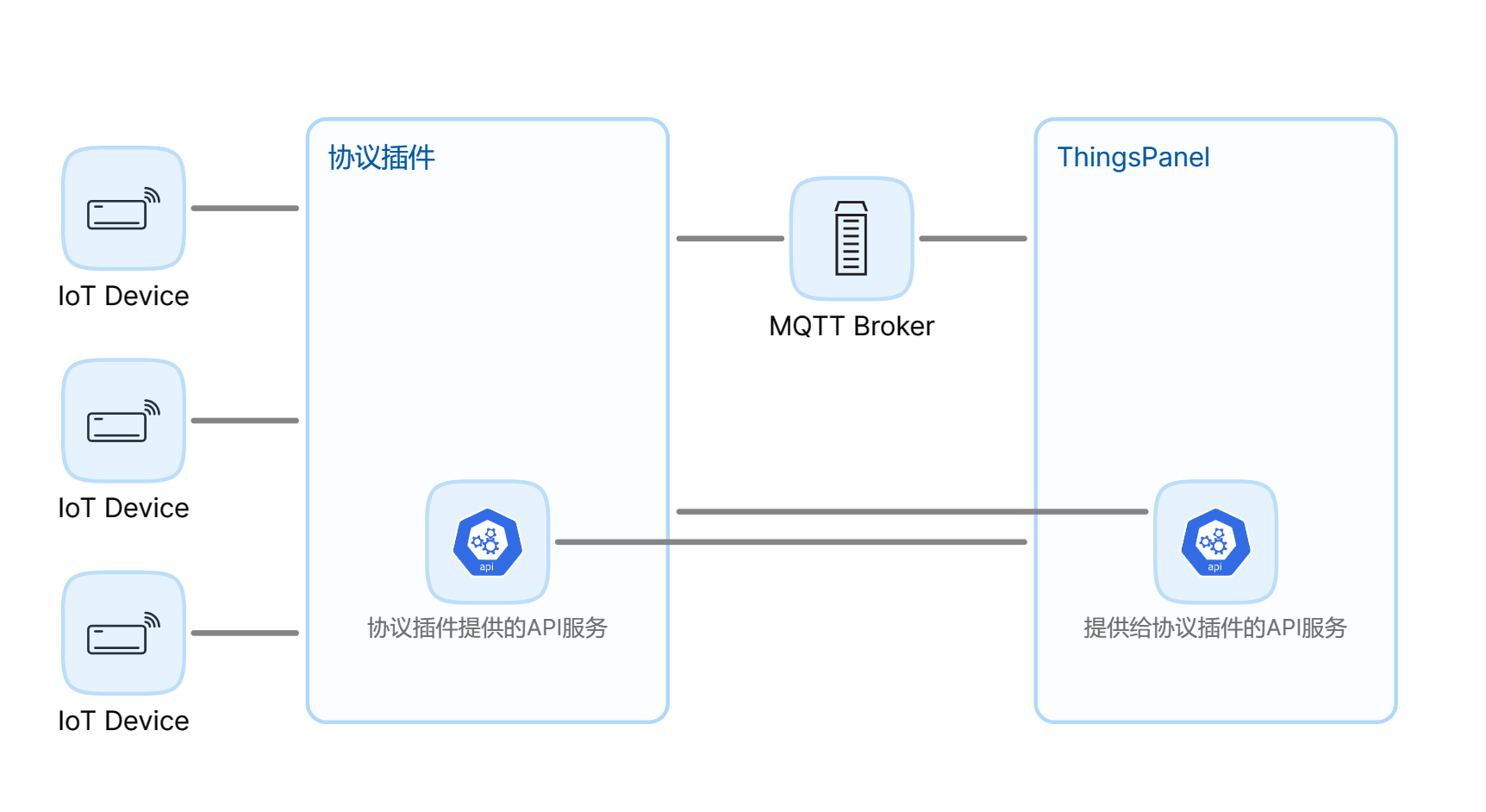
Architecture Diagram
Device Connectivity Service Interaction Flow
Development Guide
Preparation
Development Steps
1. Download Service Template
git clone https://gitee.com/ThingsPanel/protocol-plugin-template.git
2. Understand Core Concepts
Understanding ThingsPanel's four data models is crucial for plugin development:
- 🔄 Telemetry - Real-time data reported by devices, usually measurements changing over time.
- 📋 Attributes - Static or less frequently changing characteristics of devices.
- 🎯 Events - Specific events or state changes occurring in devices.
- ⚡ Commands - Control instructions sent from the platform to devices.
3. Modify Template Code
- Read
README-DEV.mdin the template source. - Update SDK to latest version:
go get -u github.com/ThingsPanel/tp-protocol-sdk-go@latest - Modify credential form
from_voucher.jsonbased on protocol docs. - Determine if configuration form is needed.
- Modify interface implementation in
http_service/service.go.
4. Register Device Connectivity Service
Register the service on the platform using a Super Admin account:
- App Management → Connectivity Service Management → Add New Service
5. Write Core Logic
- Handle upstream/downstream device messages.
- Use AI tools to assist in generating protocol parsing code.
- Interact with the platform via MQTT client.
6. Integration Testing
- Create device template and select protocol.
- Create device and bind template.
- Fill in device credential info.
- Connect device to the service and test.
Technical Specifications
Reference API Docs: ThingsPanel API Docs
Table of Contents:
- ✨ Device Connectivity Service - Platform Provided
- ✨ Device Connectivity Service - Service Provided
Data Interaction Specifications
Service Pushes Data to Platform
Direct Device / Sub-device / Gateway Device Messages
- MQTT User: plugin
- Publish Topic:
device/telemetry - MESSAGE Format:
{"device_id":"device_id","values":{"key":"value"}}
Online/Offline Notification
- Publish Topic:
devices/status/{device_id} - Payload: 0 - Device Offline 1 - Device Online
Platform Pushes Data to Service
Subscribe Topic Spec
The service needs to subscribe to topics with a prefix:
- Subscribe Topic:
plugin/{service_identifier}/# - Explanation:
plugin/{service_identifier}/is the prefix filled in during registration. The#part follows the MQTT Device Onboarding Rules.
The service's subscription topic adds a prefix compared to the platform downstream spec. Also device_number should be changed to device_id.
Service Registration
Registration Parameters
| Parameter | Description |
|---|---|
| Service Name | Displayed in protocol dropdown when creating device template |
| Service Identifier | Unique ID in the system, alphanumeric |
| Category | Select access protocol |
| HTTP Service Address | Address for platform backend to access service API, e.g., 127.0.0.1:8151 |
| Service Sub Prefix | Format like service/{name}/ |
| Device Onboarding Address | Displayed under device credential management, prompt for user device connection address |
Registration Method
Platform Registration
- Login as Super Admin.
- Go to Integration Management → Connectivity Service Management.
- Click Add New Service.
- Fill in configuration info.
Resources
Best Practices
- Message ID Management: Recommend using last 7 digits of timestamp to ensure uniqueness in short term.
- Device Uniqueness: Ensure device ID is globally unique in the system.
- Error Handling: Implement complete error response mechanism for diagnosis.
- Performance: Recommend parsing data within the service to avoid script conversion.
- Form Validation: Validate JSON format before reporting.
- Device State Management: Implement state management including online/offline.