Custom Topic & Message
I. Overview
Topic transformation is used to map device custom MQTT topics to platform standard topics, enabling non-intrusive access for devices from different vendors.
Core Concepts:
- Original Topic: The actual topic published/subscribed by the device.
- Target Topic: The platform's standardized topic.
- Data Direction:
- Uplink: Device → Platform
- Downlink: Platform → Device
Function Combination: Topic transformation can be combined with Data Processing functions to perform format conversion and field mapping on uplink/downlink messages, solving access issues for devices with non-standard messages.
II. Uplink Topic Transformation
Definition
The actual MQTT topic published by the device. Supports using + as a path placeholder to match variable parts. Does not support #. Optional variables can be used to distinguish messages.
Basic Example
Device Publishes: 123456789/up/devices
Mapping Configuration:
- Original Topic:
+/up/devices - Target Topic:
devices/telemetry
Result: Messages published by the device to 123456789/up/devices will be automatically forwarded to the platform standard topic devices/telemetry.
About message_id
- Auto Generation: If the target topic is configured as
devices/attributes/{message_id}, the device does not need to carrymessage_idwhen publishing; the system will generate it automatically. - Response Tracking: The response topic will carry
message_idfor the device to identify the corresponding response content.
III. Downlink Topic Transformation
Definition
The actual MQTT topic subscribed by the device. Supports dynamic variables. The target topic can end with + to match message_id.
Basic Example
Device Subscribes: 123456789/down
Mapping Configuration:
- Original Topic:
{device_number}/down - Target Topic:
devices/telemetry/control/{device_number}
Result: Messages published by the platform to devices/telemetry/control/123456789 will be automatically forwarded to the topic 123456789/down subscribed by the device.
Multi-Mapping Scenario
When a device supports multiple command types, data_identifier is used to identify and route them.
Configuration Example:
Mapping 1: devices/command/{device_number}/+ → wled/{device_number}/cmd (data_identifier = "wled")
Mapping 2: devices/command/{device_number}/+ → default/{device_number}/cmd (data_identifier = "default")
Message Processing Flow:
- Web sends:
{"method": "wled", "params": {"delay": 3}}todevices/command/{device_number}/+ - System matches
method="wled"→ Hits Mapping 1 - Device receives:
{"delay": 3}atwled/{device_number}/cmd(onlyparamspart is forwarded)
Fallback Rule:
- If none of the configured
data_identifiermatches, the configuration with emptydata_identifier(first one found) is used for forwarding (payload remains unchanged).
IV. Data Processing Function
Definition
The data processing function is used to pre-process uplink/downlink messages, including format conversion, field mapping, and data cleaning, to resolve inconsistencies between device message formats and platform standards.
Use Cases
Scenario 1: Non-JSON Format to JSON Format
Some devices report data in custom format or CSV format, which needs to be converted to platform standard JSON format.
- Device Report Format (Custom separator):
temp:25.5|hum:60|press:1013.25 - Platform Standard Format:
{"temperature": 25.5, "humidity": 60, "pressure": 1013.25} - Solution:
- Configure Topic Transformation: Map device topic
device/{device_number}/datato platform standard topicdevices/telemetry - Configure Data Processing: Use "Uplink Data Pre-processing" to parse custom format and convert to standard JSON structure.
- Configure Topic Transformation: Map device topic
Scenario 2: Nested JSON Structure to Flat JSON Structure
Some devices report data in nested structure, which needs to be flattened.
- Device Report Format (Nested):
{
  "sensor": {
    "temperature": 25.5,
    "humidity": 60
  },
  "timestamp": 1699123456
} - Platform Standard Format (Flat):
{
  "temperature": 25.5,
  "humidity": 60,
  "timestamp": 1699123456
} - Solution:
- Configure Topic Transformation: Map device topic to platform standard topic.
- Configure Data Processing: Use "Uplink Data Pre-processing" to flatten the nested structure.
Processing Flow:
Device Publish → Topic Transformation → Data Processing → Platform Standard Topic
V. Operation Steps
5.1 Enter Protocol Configuration Page
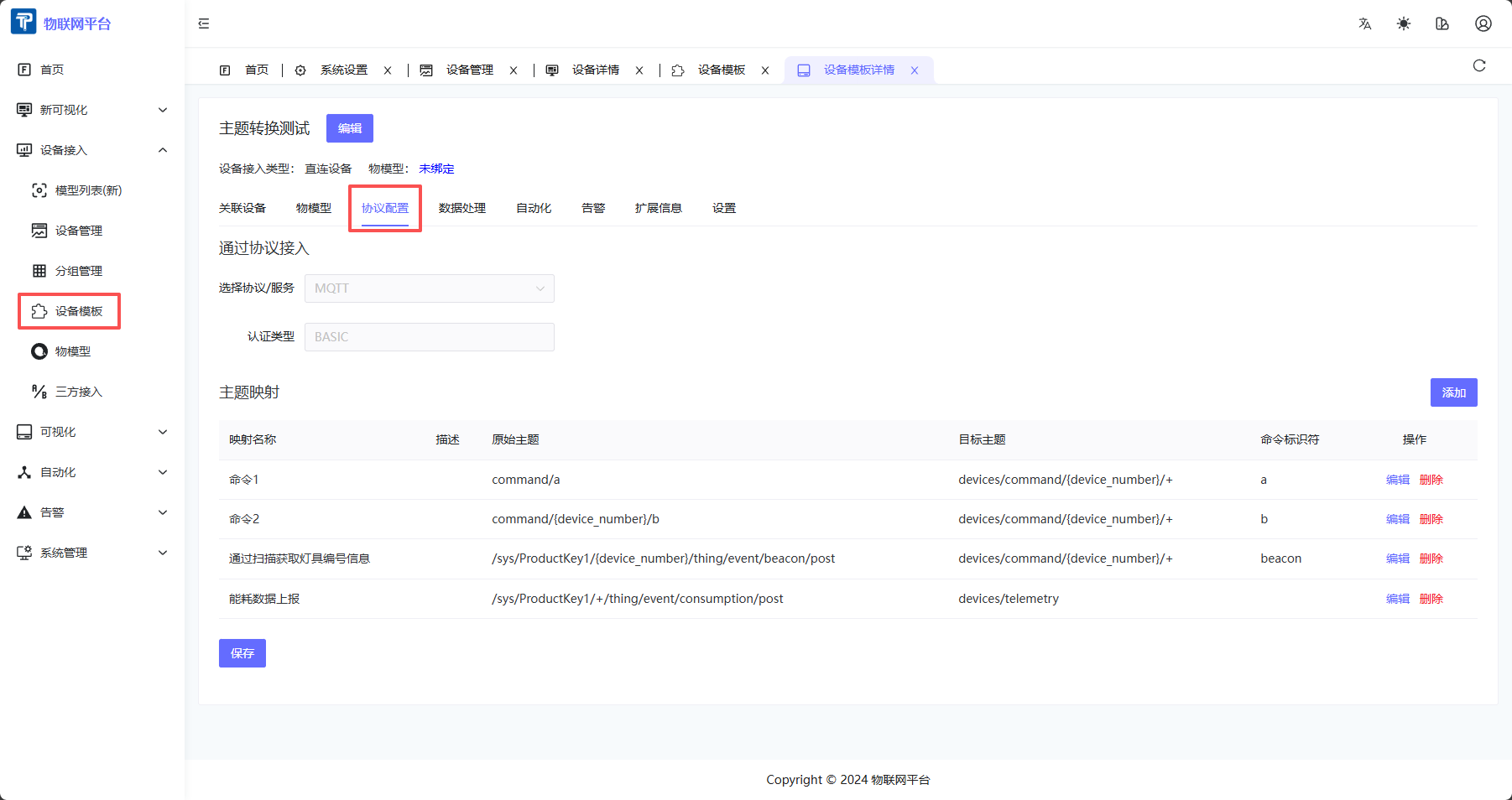
- Enter Device Template Detail Page.
- Click "Protocol Configuration" tab.
- Select Protocol Type as "MQTT".
5.2 Add Uplink Topic Mapping
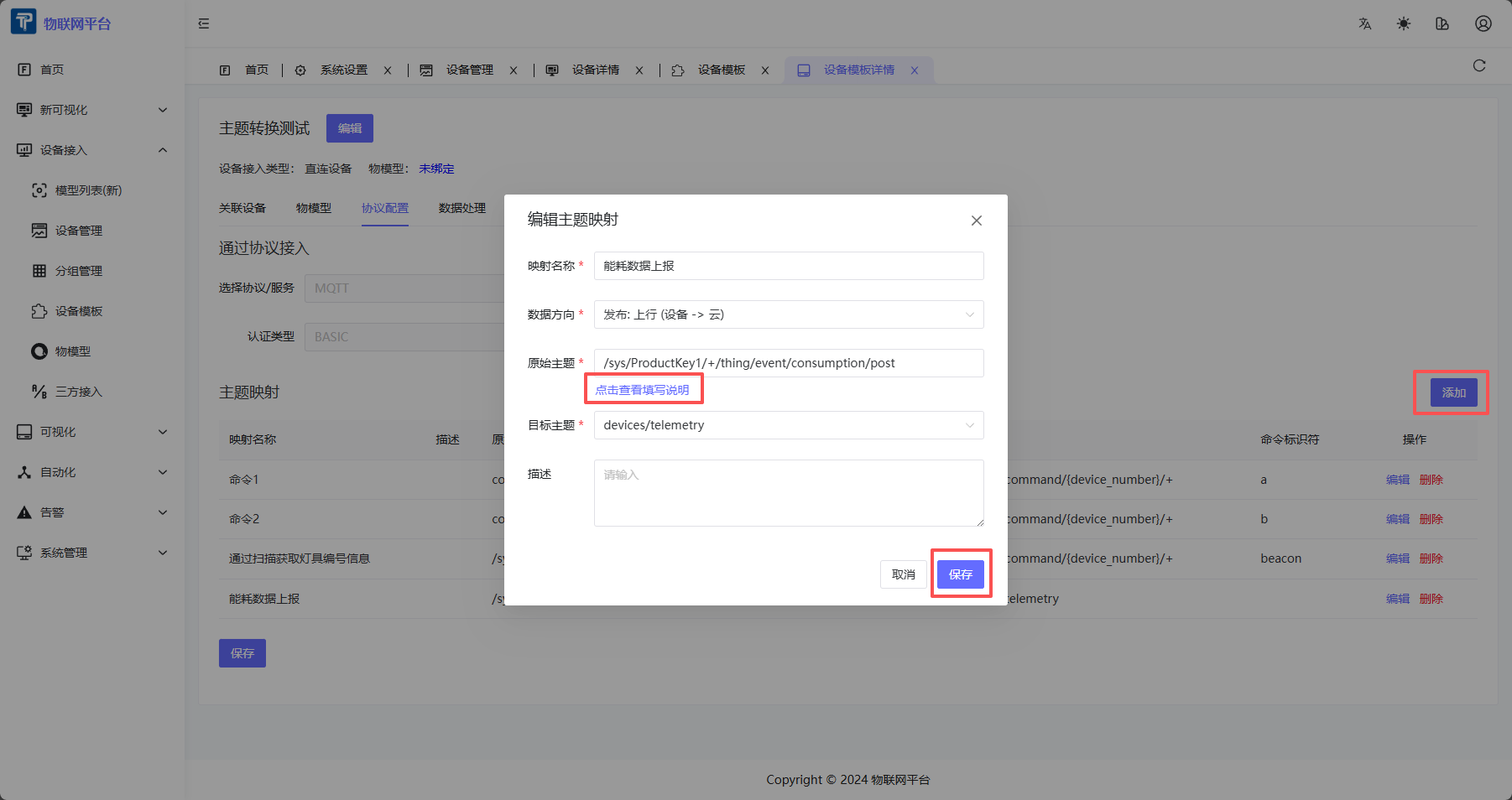
- Click "Add" button.
- Fill mapping info:
- Mapping Name: Rule name (Required).
- Data Direction: Select "Publish: Uplink (Device → Cloud)".
- Original Topic: Actual topic published by device, supports
+placeholder. - Target Topic: Platform standard topic (Dropdown selection).
- Description: Optional.
- Click "Save".
5.3 Add Downlink Topic Mapping
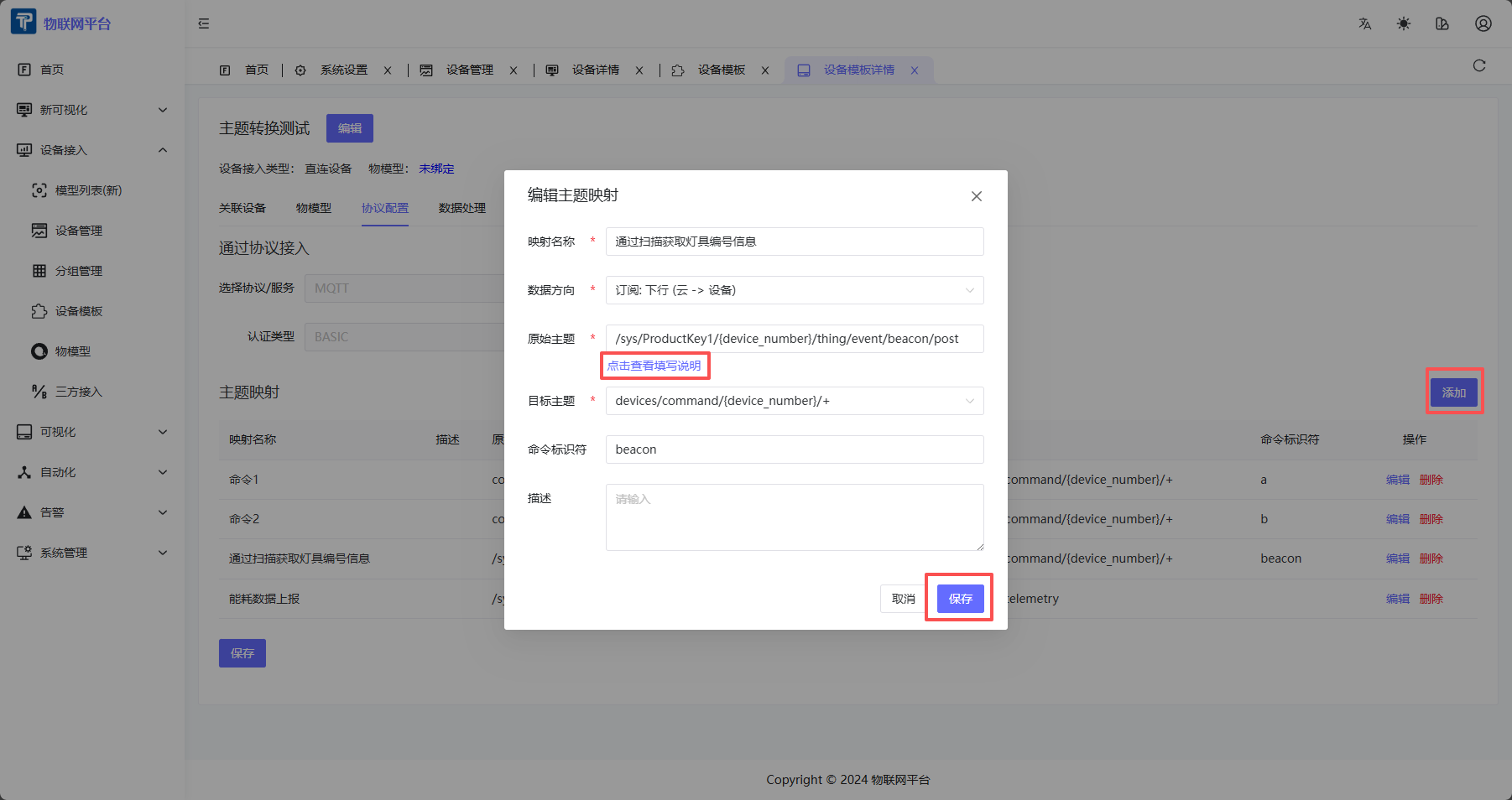
- Click "Add" button.
- Fill mapping info:
- Mapping Name: Rule name (Required).
- Data Direction: Select "Subscribe: Downlink (Cloud → Device)".
- Original Topic: Actual topic subscribed by device, must contain
{device_number}. - Target Topic: Platform standard topic (Dropdown selection).
- Command Identifier (Optional): Used for multi-mapping scenarios, matching
methodfield in payload. - Description: Optional.
- Click "Save".
5.4 Edit and Delete Mapping
- Click "Edit" to modify mapping config.
- Click "Delete" to remove mapping rule.
- Click "Save" at bottom of page to apply changes.
5.5 Configure Data Processing
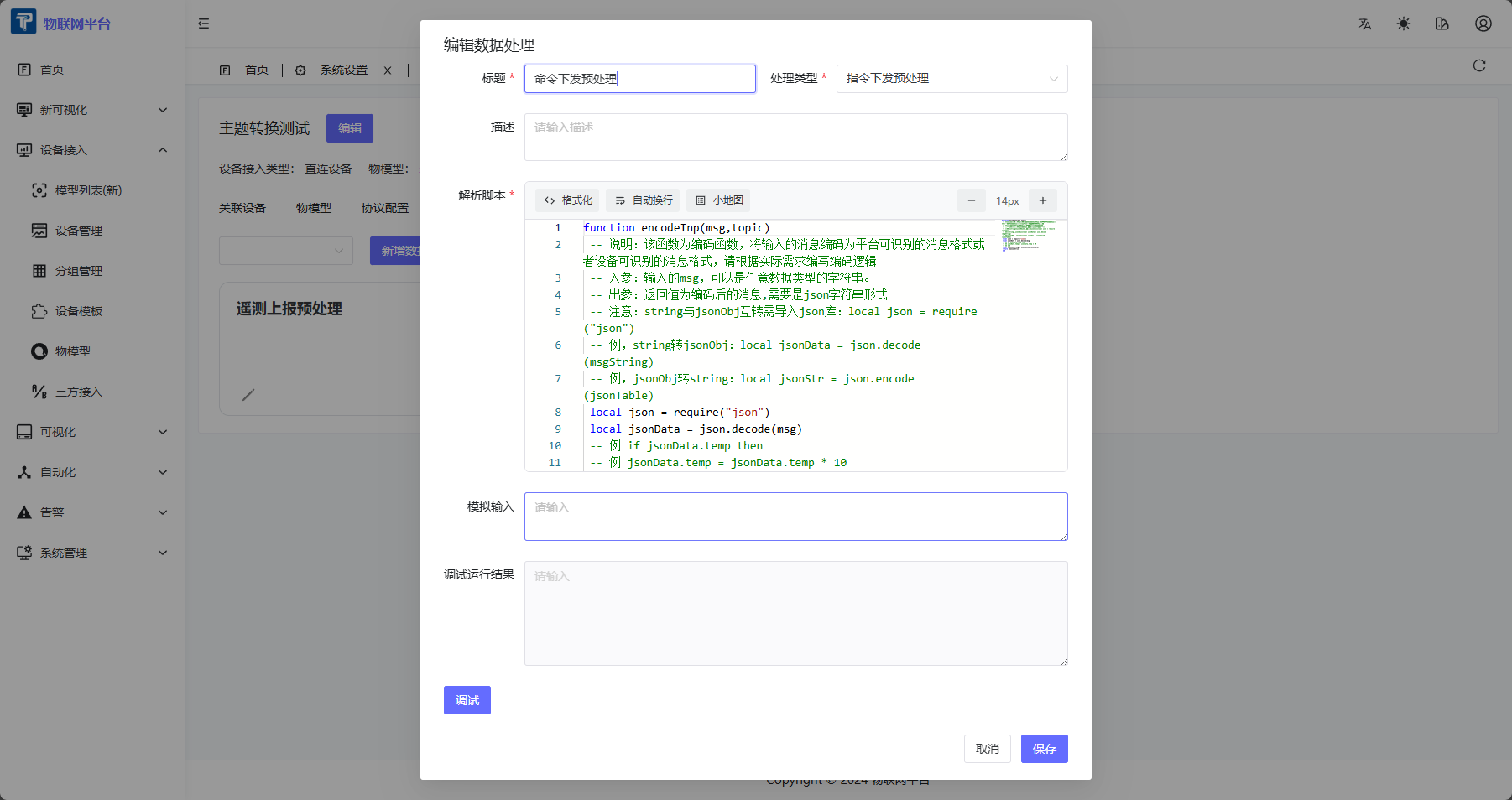
- In Device Template Detail Page, click "Data Processing" tab.
- Click "Add Data Processing" button.
- Select Processing Type:
- Uplink Data Pre-processing: Process telemetry data reported by device.
- Downlink Data Pre-processing: Process control data sent by platform.
- Attribute Uplink/Downlink Pre-processing: Process attribute related data.
- Command Downlink Pre-processing: Process command downlink data.
- Event Uplink Pre-processing: Process event uplink data.
- Configure data processing rules (e.g., field mapping, format conversion).
- Save configuration.
Processing Order:
- Topic Transformation executes first, forwarding message to standard topic.
- Data Processing executes next, converting message content format.
VI. Notes
-
Placeholder Rules:
- Supports
+(Single level match), does NOT support#(Multi-level match). - Downlink original topic MUST contain
{device_number}variable.
- Supports
-
Priority:
- Mappings match in order of priority (small to large).
- Smaller priority means earlier matching.
-
Multi-mapping Matching:
- For downlink topic transformation, configurations with non-empty
data_identifierare matched first. - On successful match, payload is simplified to
paramspart. - On no match, fallback to configuration with empty
data_identifier(payload remains unchanged).
- For downlink topic transformation, configurations with non-empty
-
Cache Mechanism:
- Mapping config changes automatically clear cache.
- If config doesn't take effect, wait for cache refresh or restart service.
-
Topic Transformation vs Data Processing:
- Topic Transformation handles topic mapping.
- Data Processing handles message content conversion.
- Can be used together for complete non-standard device access.
VII. Common Questions
Q: Why is the message published by the device not forwarded?
A: Check:
- Is Original Topic pattern correctly matching actual device topic?
- Is device associated with the correct device template?
Q: Why is the payload of downlink message modified?
A: When data_identifier matches successfully, system automatically simplifies payload to params part. To keep it unchanged, use a fallback configuration with empty data_identifier.
Q: How to test if topic mapping is working?
A: Use MQTT client tool:
- Uplink: Simulate device publishing to original topic, observe if platform standard topic receives message.
- Downlink: Publish to standard topic on platform, observe if device subscribed to original topic receives message.
Q: What is the difference between Topic Transformation and Data Processing?
A:
- Topic Transformation: Solves topic name inconsistency, maps device custom topic to platform standard topic.
- Data Processing: Solves message format inconsistency, converts message content, maps fields, etc.
- Both used together solve complete access requirements for non-standard devices.