One Type One Secret
Core Principle

The core principle of "One Type One Secret" authentication is:
- "One Type": Represents a class of devices sharing the same Type Secret (Template Secret).
- "One Secret": Represents the exclusive unique connection credential (Voucher) eventually obtained by each device.
This mechanism balances production convenience and security, avoiding the complexity of pre-setting unique secrets for every single device.
Three Key Stages
1. Type Secret Preset Stage
- Platform: Create Device Template, generate Template Secret.
- Device: Preset Template Secret during production (shared by same type devices).
2. Device Authentication Stage
- Device: Determine own unique ID (e.g., Chip ID, MAC, IMEI).
- Device → Platform: Send auth request containing Template Secret and Unique ID.
- Platform: Validate Template Secret and Unique ID.
3. Credential Issuance Stage
- Platform: Generate unique connection credential for valid device.
- Platform → Device: Send credential.
- Device: Save credential for subsequent secure connections.
info
This mechanism effectively solves security and efficiency issues in large-scale IoT deployment, suitable for various platforms and scenarios.
ThingsPanel Design
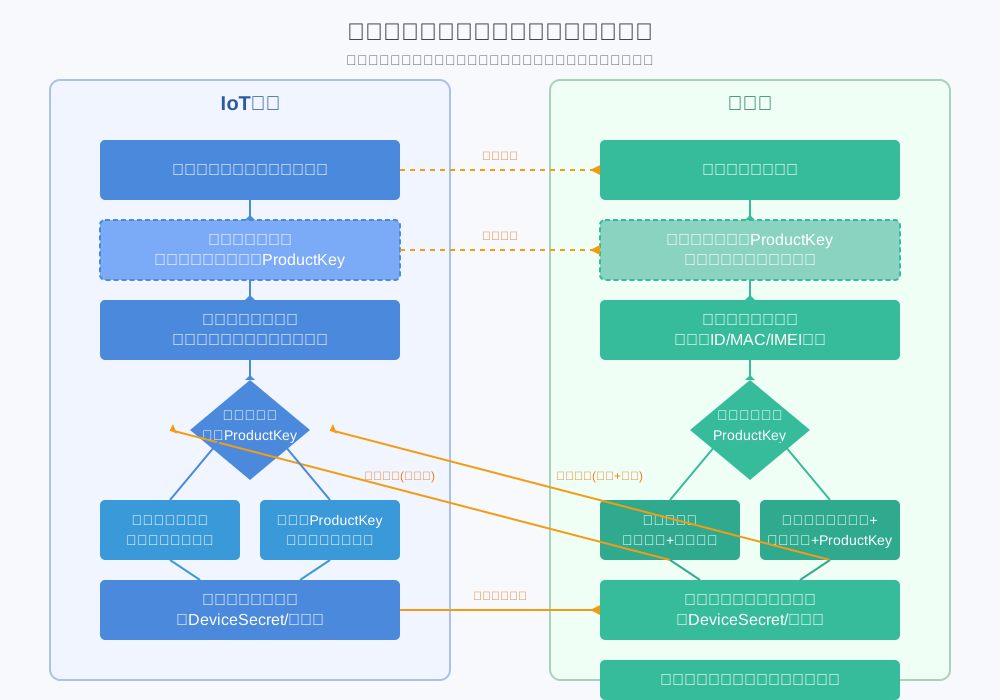
Flow with Template Secret Only

Flow with Template Secret + ProductKey

API Specification
Dynamic Authentication Interface
URL: POST /api/v1/device/auth
Description: Supports One Type One Secret dynamic authentication.
Request Parameters
| Param | Type | Required | Description |
|---|---|---|---|
template_secret | string | ✅ | Template Secret |
device_number | string | ✅ | Device Unique ID (MAC, IMEI, etc.) |
device_name | string | ❌ | Device Name |
product_key | string | ❌ | Product Key (for association) |
parent_device_number | string | ❌ | Parent Device ID (Required for sub-device) |
sub_device_addr | string | ❌ | Sub-device Address (Required for sub-device) |
Request Example
{
  "template_secret": "your_template_secret",
  "device_number": "your_device_unique_id",
  "device_name": "DeviceName",
  "product_key": "your_product_key"
}
Response Parameters
| Param | Type | Description |
|---|---|---|
code | integer | Status code, 200 = Success |
message | string | Message |
data | object | Data |
└─ device_id | string | Device ID |
└─ voucher | string | Voucher |
Response Example
{
  "code": 200,
  "message": "Success",
  "data": {
    "device_id": "4e7e16dc-b1e7-5eef-32a6-48a7d767c85f",
    "voucher": "{\"username\":\"6c2f1bdc-6fc2-b535-f0ba-f77fe9dc6db1\"}"
  }
}
User Guide
🚀 Preparation
- Create Device Template and get Template Secret.
- Determine Device Unique ID.
- Prepare Product Key if needed.
📋 Process
- Device sends auth request to
/api/v1/device/authon startup. - Platform validates.
- Platform returns Device ID and Voucher.
- Device saves Voucher.
⚠️ Notes
- Template Secret is shared, keep it safe.
- Device Unique ID must be globally unique.
- Securely store the Voucher.
- Cache Voucher locally after first auth.