TCP
There are two ways for TCP device connectivity:
1. Via TCP Device Connectivity Service
TCP Device Connectivity Service runs separately. Devices interact with platform through it. It can run on the same machine or a different machine accessible via network.
Protocol Classification
Supports two types:
- Custom TCP Protocol
- Official TCP Protocol
note
Both types support Standard Device and Gateway Device.
Custom TCP Protocol
Pass-through mode.
Steps:
-
Create device, select
Custom TCP Protocolin Edit Params, get AccessToken and address.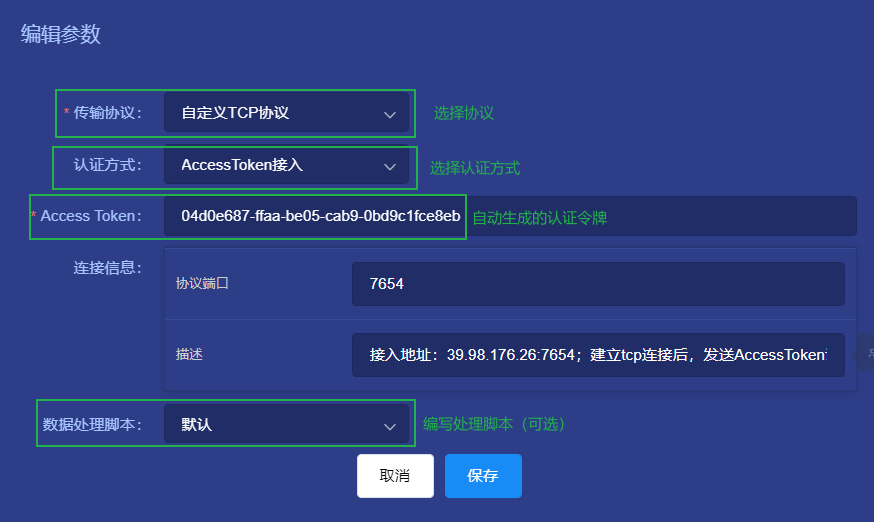
-
In Device Config, set buffer size (Default 1KB).
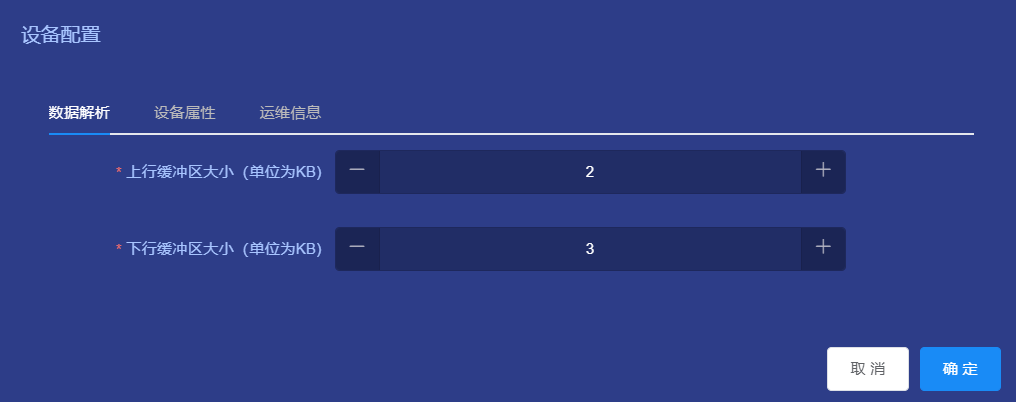
-
Write Data Processing Script (Device List -> Edit Params -> Script).
- Uplink Script: Convert custom TCP msg to platform JSON.
- Device:
{"temperature":36.5,"humidity":52} - Gateway:
{"3c20c6206":{"temperature":36.5,"humidity":52}}("3c20c6206" is sub-device addr).
- Device:
- Downlink Script: Convert platform JSON to custom TCP msg.
- Uplink Script: Convert custom TCP msg to platform JSON.
-
Establish connection, push AccessToken first for authentication.
Official TCP Protocol
Defined spec by the service.
Spec
Connect and send structure:
| IDENT | IDENT | TYPE | CMD | LENGTH | PAYLOAD |
|---|---|---|---|---|---|
| 'T' | 'P' | 1 byte | 1 byte | 4 byte | Variable |
- TYPE:
0x0: Data Packet
0x1: Heartbeat - CMD:
0x0: Auth
0x1: Publish Attributes
0x2: Push Events - LENGTH: Payload length
- PAYLOAD: Data
If CMD 0x0, Payload is AccessToken
If CMD 0x1, Payload is Attributes
If CMD 0x2, Payload is Events
Steps
- Create device, select
Official TCP Protocol, get AccessToken. - (Optional) Write script if Payload is not platform JSON.
- Establish connection, send CMD 0x0 with AccessToken. Then send Attrs/Events.