GB28181 Security Camera
- Use ThingsPanel GB28181 Device Connectivity Service to directly access national standard cameras.
- Default built-in function, requires additional configuration of GB28181 device connectivity service.
- Supported since version 0.4.6.
What is GB28181 Protocol?
GB28181 is the national standard for video surveillance in China. GB28181 refers to the national standard GB/T 28181—2016 "Technical Requirements for Information Transmission, Exchange, and Control of Public Security Video Surveillance Networking Systems".
The standard specifies the interconnection structure, basic requirements for transmission, exchange, control, and security requirements, as well as technical requirements for control, transmission processes, and protocol interfaces for public security video surveillance networking systems. The GB28181 protocol uses SIP (Session Initiation Protocol) at the signaling level.
The streaming media transmission level uses the Real-time Transport Protocol (RTP). Therefore, GB28181 can be understood as a privatization customization based on international general standards to meet the standardization needs of video surveillance networking system interconnection transmission. This article aims to explain adding support for the GB28181 protocol in FFmpeg, enabling it to communicate and control devices supporting the GB28181 protocol, realizing device registration, keep-alive, and streaming media transmission.
Supported Features
- National standard cascade camera access.
- Real-time video stream monitoring.
- PTZ control.
- Recording and playback functions.
Adopted Solution
- GB28181 access uses wvp-GB28181-pro project
- WEB VIDEO PLATFORM is a network video platform based on GB28181-2016 standard, supporting NAT traversal, access for IPC, NVR, DVR of brands like Hikvision, Dahua, Uniview. Supports national standard cascading, supports RTSP/RTMP stream forwarding to national standard platform. Used under MIT license. ThingsPanel uses this project but has not done secondary development based on it.
- Streaming media platform uses ZLMediaKit
- ZLMediaKit is a high-performance carrier-grade streaming media service framework based on C++11. Used under MIT license. ThingsPanel uses this project but has not done secondary development based on it.
Configuration Process
To add GB28181 access to ThingsPanel platform, follow these steps:
- Install WVP Service
- Add GB28181 Device Connectivity Service
Install WVP Service
docker pull 648540858/wvp_pro
docker run  --env WVP_IP="192.168.31.10" -it -p 18080:18080 -p 30000-30500:30000-30500/udp -p 30000-30500:30000-30500/tcp -p 80:80 -p 5060:5060 -p 5060:5060/udp 648540858/wvp_pro
Then visit 192.168.31.10:18080 (Cloud may need port opening).
Usage Process
- If no device connectivity service, register one first (App Management -> Access Protocols -> Register Device Connectivity Service).
| Name | Device Type | Protocol Type | Access Address | HTTP Server Address | Service Subscribe Topic Prefix | Author | Description |
|---|---|---|---|---|---|---|---|
| GB28181 | Gateway | WVP_01 | 127.0.0.1:18080 | http://127.0.0.1:18080\|\|admin\|\|admin | - | - | - |
Explanation:
Device Type: Must select Gateway
Protocol Type: Must start with WVP_
Access Address: No actual effect, displayed in connection info.
HTTP Server Address: Required, WVP service address, followed by username and password separated by ||; Address for ThingsPanel to interact with WVP platform.
- Add device and select GB28181 Camera as Device Connectivity Service.
- Select GB28181 Protocol.
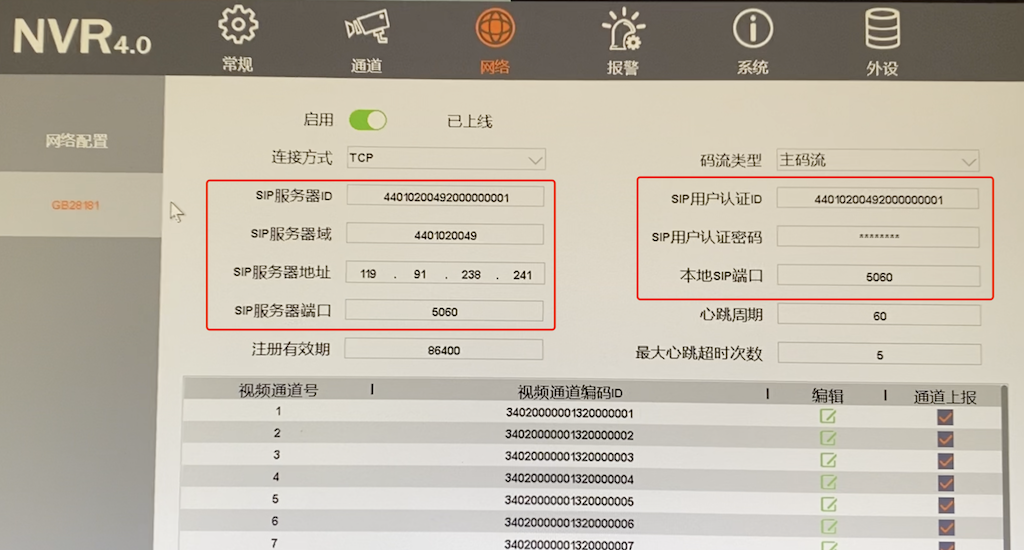
- Configure IP, Port, Domain ID, Username, Password on device side.
- View video stream in Device Monitoring.